
Given the large number of individuals using and accessing websites on their mobile devices, it is very important to check that websites function accurately and nicely, even when on slow networks. However, it is worth noting that running a test site on mobile correctly, not just requires reviewing design and features, but also requires ensuring fast and seamless loading in real-world scenarios, such as poor connections or limited bandwidth. This is extremely important in regions with inconsistent internet speed.
Table of Contents
Importance of UX Optimization for Mobile Sites
User expectations are higher than ever. People expect instant access, seamless navigation, and responsive interactions—regardless of their connection quality. When these expectations aren’t met, users quickly abandon the experience.
Why UX Optimization Matters
| Benefit | Impact on Business |
|---|---|
| Faster load times | Keeps users engaged |
| Better conversions | Especially critical for e-commerce |
| Improved SEO | Google prioritizes page speed |
| Lower bounce rates | Reduces user drop-offs |
| Higher retention | Builds trust and usability |
An optimized mobile experience directly influences both user satisfaction and search visibility.
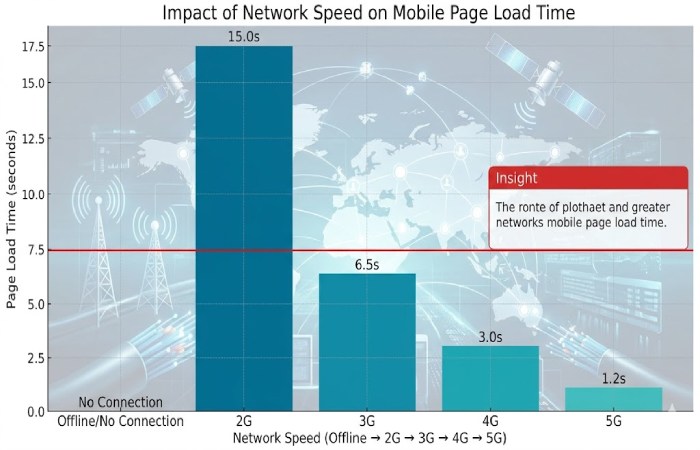
How Slow Networks Affect Mobile UX
When users browse on slow networks or limited bandwidth, the experience degrades significantly. These issues are not minor—they directly impact usability and perception.
Common UX Issues on Slow Networks
| Issue | Description | UX Impact |
|---|---|---|
| Longer load times | Pages take more time to render | Frustration, exits |
| Delayed content | Media loads late or fails | Incomplete experience |
| Poor interactivity | Buttons and forms lag | Reduced usability |
| High data usage | Large files consume more data | Cost concerns |
Optimizing for both fast and slow conditions ensures your site is inclusive and resilient.
Methods for Evaluating Mobile UX on Slow Networks
Testing under realistic conditions is critical. Instead of relying on ideal scenarios, simulate real-world limitations.
Key Testing Methods
| Method | How It Works | Benefit |
|---|---|---|
| Network throttling | Simulate slow speeds like 3G | Identify bottlenecks |
| Real device testing | Test on actual smartphones | Accurate UX insights |
| Emulators/simulators | Virtual device environments | Quick UI validation |
| Cloud testing platforms | Access multiple devices remotely | Scalable testing |
Simulating Real-Life Conditions with Network Throttling
Network throttling helps replicate slower internet speeds to observe how your site behaves under stress. This method helps uncover hidden performance issues that only appear under constrained conditions.
| Step | Action |
|---|---|
| 1 | Open DevTools in Chrome DevTools |
| 2 | Go to “Network” tab |
| 3 | Select Slow 3G or similar |
| 4 | Reload page and analyze performance |
Testing with Real Devices
Testing on real devices provides the most accurate representation of user experience. Unlike emulators, real devices account for:
- Hardware limitations
- Screen rendering differences
- Network variability
Platforms like LambdaTest offer access to thousands of real devices without maintaining physical inventory.
Real Device Testing Features

Testing on Emulators & Simulators
Emulators and simulators are useful for quick testing and early-stage validation. While they don’t fully replicate real-world conditions, they help identify UI and layout issues.
| Tool Type | Strength | Limitation |
|---|---|---|
| Emulators | Easy setup | Less accurate performance |
| Simulators | Fast testing | No real hardware impact |
Using them alongside real devices ensures comprehensive testing coverage.
Using Progressive Web App (PWA) Techniques
Progressive Web Apps improve performance under poor network conditions by enhancing reliability and speed.
Key PWA Features
| Feature | Function | UX Benefit |
|---|---|---|
| Service Workers | Cache content | Offline access |
| Lazy loading | Load content on demand | Faster initial load |
| Data compression | Reduce payload size | Lower data usage |
These techniques ensure your site remains functional even in low-connectivity environments.
Key Performance Metrics to Track
Tracking the right metrics helps you understand how your site performs under different conditions.
Essential Metrics
Monitoring these ensures data-driven optimization decisions.
| Metric | What It Measures | Why It Matters |
|---|---|---|
| Time to First Byte (TTFB) | Server response time | Backend efficiency |
| First Contentful Paint (FCP) | First visual render | Perceived speed |
| Largest Contentful Paint (LCP) | Main content load time | Core UX metric |
| Cumulative Layout Shift (CLS) | Visual stability | Smooth experience |
Optimization Techniques for Low Bandwidth
Improving performance requires reducing load, prioritizing content, and minimizing unnecessary resources.
Media Optimization
Large images and videos are the biggest contributors to slow loading.
| Technique | Benefit |
|---|---|
| Responsive images | Smaller downloads |
| WebP format | Better compression |
| Image compression tools | Reduced file size |
| Disable autoplay videos | Save bandwidth |
Adaptive and Responsive Design
Responsive design ensures your site adapts to different devices and network conditions.
| Feature | Benefit |
|---|---|
| Adaptive images | Faster loading |
| Media queries | Device-specific layouts |
| Content prioritization | Critical content first |
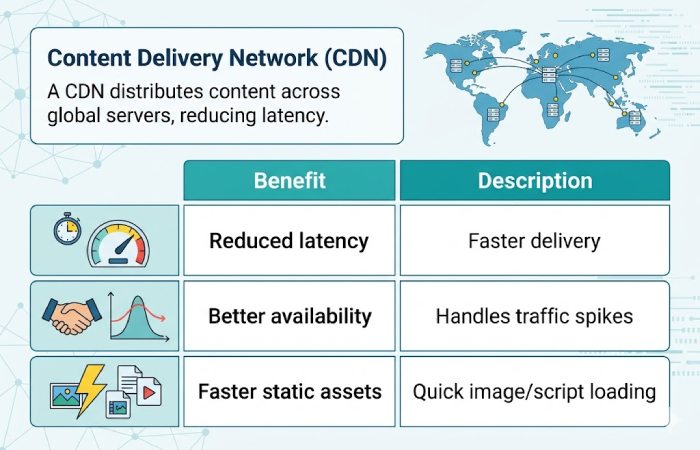
Content Delivery Network (CDN)
A CDN distributes content across global servers, reducing latency.
Reducing HTTP Requests
Each request slows down loading time, especially on slow networks.
| Technique | Result |
|---|---|
| Combine CSS/JS files | Fewer requests |
| Use CSS sprites | Fewer image calls |
| Minimize assets | Faster loading |
Lazy Loading
Lazy loading delays loading of non-critical resources until needed.
| Benefit | Impact |
|---|---|
| Faster initial load | Better UX |
| Reduced data usage | Cost-efficient |
| Improved performance | Especially on mobile |
Plugin and Script Optimization
Heavy plugins can significantly slow down your site.
| Strategy | Benefit |
|---|---|
| Use native features | Less dependency |
| Remove unused scripts | Faster load |
| Limit third-party tools | Better control |
CSS and JavaScript Optimization
Optimizing code reduces file size and improves speed.
| Technique | Benefit |
|---|---|
| Minification | Smaller files |
| Async loading | Non-blocking rendering |
| Code splitting | Efficient delivery |
Web Font Optimization
Fonts can delay rendering if not handled properly.
| Strategy | Benefit |
|---|---|
| Limit font styles | Faster load |
| Use font-display | Better rendering control |
Browser Caching
Caching reduces repeated downloads for returning users.
| Benefit | Impact |
|---|---|
| Faster repeat visits | Improved UX |
| Reduced server load | Better scalability |
Analyzing Test Results
After testing, analyzing performance data helps identify issues and opportunities for improvement.
Performance Analysis Approach
| Step | Action |
|---|---|
| Data collection | Gather metrics like load time |
| Trend analysis | Identify slow network behavior |
| Tool usage | Use Google PageSpeed Insights or GTmetrix |
Identifying UX Issues
| Issue Type | Example | Solution |
|---|---|---|
| Slow loading | Delayed images | Optimize media |
| Broken elements | Missing UI parts | Fix rendering |
| Unresponsive UI | Buttons lag | Reduce JS |
Fixing these improves UX significantly under constrained conditions.
Continuous Testing and Improvement
Optimization is not a one-time task—it requires ongoing monitoring and iteration.
Continuous Testing Benefits
| Benefit | Description |
|---|---|
| Early issue detection | Prevent major problems |
| Better adaptability | Keep up with changes |
| Improved performance | Continuous refinement |
Gathering User Feedback
User feedback provides real-world insights into performance. Combining feedback with performance data ensures user-centered optimization.
| Method | Benefit |
|---|---|
| Surveys | Direct feedback |
| Usability testing | Behavior insights |
| Interviews | Deeper understanding |
Conclusion
Most people use their phones, it’s essential to make sure your website offers a smooth experience, even if the internet is slow or the connection isn’t great. By using smart testing strategies and constantly improving performance, you can create a mobile site that keeps users interested, no matter how good their internet is.