Selenium WebDriver is one of the most widely used tools for automating web applications. It allows testers and developers to simulate real user interactions by controlling browsers programmatically. This capability ensures that applications function correctly across different environments, browsers, and devices.
Unlike older tools, Selenium WebDriver communicates directly with browsers, making it faster, more reliable, and highly efficient. It supports multiple programming languages, giving flexibility to teams to work in their preferred tech stack.
Table of Contents
What is Selenium WebDriver?
Selenium WebDriver is a core component of the Selenium suite used for automated testing of web applications. It eliminates the need for an intermediate server and directly interacts with browsers through dedicated drivers.
Key Features of Selenium WebDriver
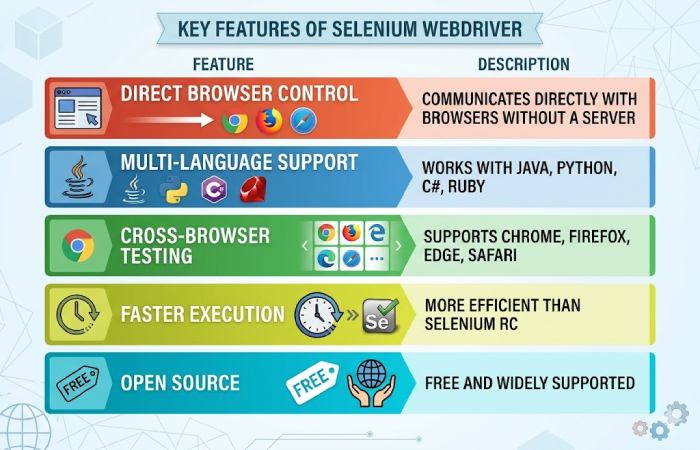
Selenium WebDriver works by using browser-specific drivers such as ChromeDriver or GeckoDriver. This enables the execution of test scripts across multiple browsers, ensuring compatibility and consistency in user experience.
API Integration with Selenium WebDriver
API integration enhances testing by validating both frontend UI and backend data. It ensures that the data displayed on the UI matches the data returned from APIs.
API Integration Techniques
| Technique | Description | Example Use Case |
|---|---|---|
| HTTP Clients | Use libraries to send API requests | Fetch product details from API |
| Data Validation | Compare API data with UI | Match product price on UI |
| Combined Testing | Merge UI + API tests | Verify user registration |
| Data-driven Testing | Use API data as test input | Test multiple user roles |
| Error Handling | Handle API failures gracefully | Continue tests on API failure |
| API Libraries | Use tools like Rest-Assured | Validate response codes |
Using API integration, testers can validate whether backend updates are correctly reflected on the frontend. This creates a more robust and reliable testing framework.
Example Workflow of API + UI Testing
| Step | Action |
|---|---|
| 1 | Send API request to fetch data |
| 2 | Store API response |
| 3 | Open UI using Selenium |
| 4 | Extract UI data |
| 5 | Compare API vs UI data |
| 6 | Log results |
This combined approach ensures both visual correctness and backend accuracy.
Best Practices for Selenium WebDriver
Using Selenium effectively requires following structured best practices to ensure maintainability, performance, and reliability.
Core Best Practices
| Practice | Benefit |
|---|---|
| Use Stable Locators (ID, Name) | Reduces test failures |
| Page Object Model (POM) | Improves code maintainability |
| Explicit Waits | Handles dynamic content |
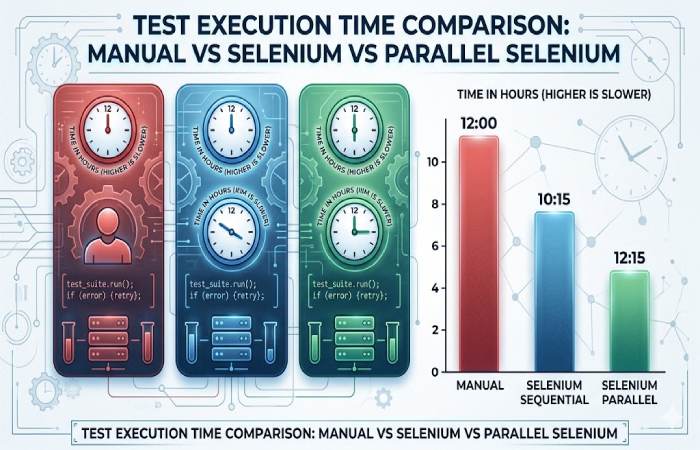
| Parallel Testing | Faster execution |
| Cloud Testing | Scalable infrastructure |
| Avoid Hardcoding Data | Easier updates |
| Error Logging | Faster debugging |
| Cross-browser Testing | Better compatibility |
| Security Handling | Protect sensitive data |
| CI/CD Integration | Continuous testing |
Cloud platforms enable teams to run tests on thousands of real browsers and devices without maintaining infrastructure. This significantly improves scalability and test coverage.
Advanced API Integration Techniques
Advanced strategies improve testing depth and help simulate real-world scenarios more effectively.
| Technique | Description | Tools |
|---|---|---|
| A/B Testing | Compare two UI versions | API + Selenium |
| API Mocking | Simulate backend responses | WireMock, Mockito |
| Test Reliability | Reduce flaky tests | Retry logic |
| Test Data Management | Maintain consistent data | Faker.js, Factory Bot |
| Performance Testing | Measure load and speed | JMeter |
| CI/CD Integration | Automate pipelines | Jenkins, GitHub Actions |
A/B Testing with APIs
A/B testing allows teams to validate different UI versions by dynamically fetching content via APIs and verifying behavior using Selenium.
Mocking APIs
| Benefit | Description |
|---|---|
| Controlled Testing | Simulate different scenarios |
| Faster Execution | No dependency on real backend |
| Reliable Results | Avoid external failures |
Mocking helps isolate frontend testing from backend dependencies, ensuring stable test execution.
Enhancing Test Reliability
Flaky tests can slow down development cycles and reduce confidence in automation.
Reliability Improvement Strategies
| Strategy | Impact |
|---|---|
| Retry Failed Tests | Reduces false negatives |
| Strong Assertions | Improves validation |
| Logging & Monitoring | Helps debug issues |
| Stable Test Data | Ensures consistency |
Managing Test Data Efficiently
Managing test data is critical for achieving repeatable and scalable automation.
Test Data Strategies
| Method | Description |
|---|---|
| API-based Data | Dynamic and real-time |
| Database Seeding | Preload test data |
| Data Cleanup | Maintain consistency |
| Data Generators | Create realistic inputs |
Performance Testing Integration
Integrating performance testing with UI automation ensures applications perform well under load.
Performance Testing Tools & Methods
| Tool/Method | Purpose |
|---|---|
| JavaScript Execution | Measure UI load time |
| JMeter | Load and stress testing |
| API Monitoring | Backend performance validation |
Continuous Learning & Community Engagement
Staying updated is essential in automation testing due to rapid technological advancements.
Learning Channels
| Platform | Benefit |
|---|---|
| Forums (e.g., Reddit) | Real-world discussions |
| Webinars | Expert insights |
| Open-source Contribution | Hands-on learning |
| Documentation | Official updates |
Conclusion
Selenium WebDriver remains a powerful and flexible automation tool for modern web applications. When combined with API integration, it provides a complete testing strategy that validates both frontend and backend functionality.
Organizations that adopt best practices, leverage cloud testing, and integrate automation into CI/CD pipelines can significantly improve software quality, reduce release risks, and accelerate development cycles.
By continuously evolving testing strategies and adopting advanced techniques like API mocking and performance testing, teams can ensure highly reliable, scalable, and user-friendly applications.