
Web browser online testing involves using a full browser—either locally or in the cloud—to interact with websites and applications in real time. While this approach closely mimics real user behavior, it comes with trade-offs. Running full browsers consumes significant system resources, introduces latency due to rendering, and can slow down large-scale testing workflows.
Browserless testing addresses these limitations by removing the graphical interface and interacting directly with web elements through code. Instead of relying on visual rendering, it works at the DOM and network level, making the process faster, more scalable, and easier to automate.
From a global development perspective, browserless testing is becoming the preferred approach for teams working with CI/CD pipelines, distributed systems, and large test suites. It is not about replacing browsers entirely, but about optimizing when and how they are used.
Table of Contents
Core Difference: Web Browser Online vs Browserless Testing
| Aspect | Web Browser Online Testing | Browserless Testing |
|---|---|---|
| Interface | Full graphical UI | No UI (headless) |
| Speed | Slower due to rendering | Faster execution |
| Resource Usage | High CPU & memory | Optimized usage |
| Setup | Requires installation/config | Minimal setup |
| Scalability | Limited | Highly scalable |
| CI/CD Integration | Moderate | Seamless |
| Reliability | Affected by UI issues | More stable |
Browserless testing shifts the focus from visual interaction to programmatic control, enabling developers to test applications more efficiently at scale.
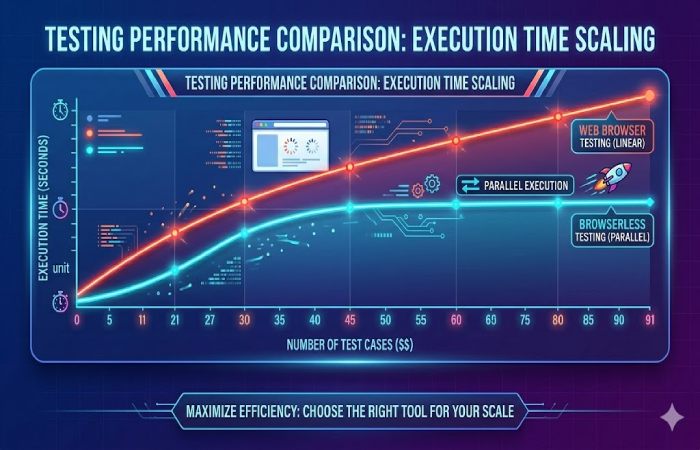
Execution time increases linearly in browser-based testing, while browserless testing scales efficiently due to parallel processing and reduced overhead.
No Browser Installation Required
One of the most immediate benefits of browserless testing is the elimination of browser installation and maintenance. Traditional setups often require managing multiple browser versions across machines, which increases complexity.
Why This Matters
Without browser dependencies, teams can standardize environments globally, reduce setup time, and avoid compatibility issues.
| Feature | Benefit | Impact |
|---|---|---|
| No installation | Faster setup | Saves time |
| No version conflicts | Consistent testing | Improves reliability |
| Reduced maintenance | Less overhead | Lower operational effort |
| Simplified configuration | Easier setup | Beginner-friendly |
| Lower system requirements | Efficient usage | Cost-effective |
Faster Test Execution
Browserless testing significantly improves execution speed by eliminating rendering overhead. Instead of waiting for pages to visually load, tests interact directly with elements.
Performance Advantage
This speed improvement is critical for modern development workflows where rapid feedback loops are essential.
| Factor | Web Browser Online | Browserless Testing |
|---|---|---|
| Page load dependency | High | Low |
| Execution speed | Moderate | High |
| Feedback time | Slower | Immediate |
| Test cycles | Longer | Shorter |
| Latency | Higher | Reduced |
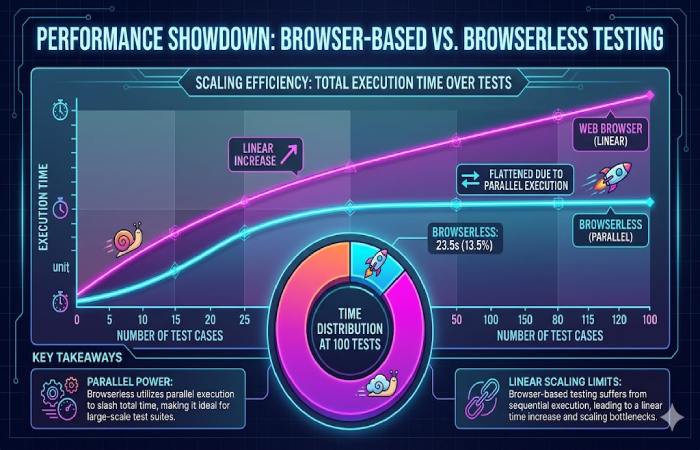
Browser-based testing shows a linear increase in execution time, while browserless testing scales efficiently due to parallel execution capabilities.
Reduced Resource Consumption
Running full browsers requires substantial CPU, memory, and storage resources. Browserless testing minimizes these requirements, making it ideal for scalable environments.
Efficiency Gains
Lower resource usage enables teams to run more tests on fewer machines, improving overall efficiency.
| Resource | Web Browser Online | Browserless Testing |
|---|---|---|
| CPU usage | High | Low |
| Memory usage | High | Optimized |
| Disk space | Large | Minimal |
| Network usage | Heavy | Efficient |
| Scalability | Limited | High |
CI/CD Integration
Browserless testing integrates naturally into modern CI/CD pipelines, allowing automated testing at every stage of development.
Workflow Optimization
This integration ensures that tests run automatically with every code change, improving quality and reducing deployment risks.
| CI/CD Feature | Benefit |
|---|---|
| Automated testing | Continuous validation |
| Faster builds | Reduced pipeline time |
| Efficient workflows | Streamlined processes |
| Consistent results | Reliable outputs |
Lower Infrastructure Costs
Maintaining browser-based testing environments can be expensive due to hardware requirements and maintenance overhead. Browserless testing reduces these costs significantly.
Cost Efficiency
| Cost Factor | Web Browser Online | Browserless Testing |
|---|---|---|
| Hardware needs | High | Low |
| Maintenance | Ongoing | Minimal |
| Scaling cost | Expensive | Cost-effective |
| Operational expenses | Higher | Lower |
Simplified Test Environment Setup
Browserless testing simplifies environment setup by removing dependencies on browser installations and configurations.
Operational Simplicity
| Setup Element | Browser-Based | Browserless |
|---|---|---|
| Configuration complexity | High | Low |
| Setup time | Longer | Shorter |
| Environment consistency | Variable | Stable |
| Maintenance effort | High | Reduced |
Enhanced Parallel Testing with Cloud Platforms
Cloud platforms enable browserless testing to scale efficiently, allowing multiple tests to run simultaneously across distributed environments.
Cloud Advantage
Platforms like LambdaTest provide global infrastructure to support large-scale testing.
| Feature | Benefit |
|---|---|
| Concurrent execution | Faster testing |
| Increased throughput | More tests in less time |
| Scalable resources | Flexible infrastructure |
| Efficient allocation | Optimized usage |
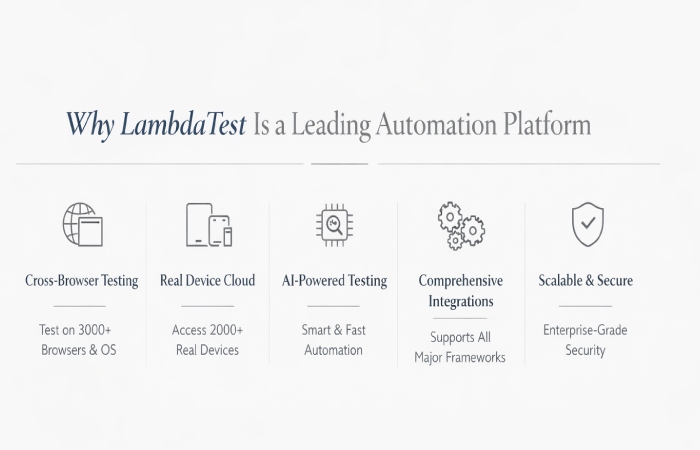
Why LambdaTest Is a Leading Automation Platform
Browserless testing becomes even more powerful when combined with cloud-based platforms.
Improved Test Reliability
Browserless testing reduces inconsistencies caused by browser behavior, leading to more stable results.
Reliability Factors
| Factor | Impact |
|---|---|
| Consistent execution | Predictable results |
| Stable environments | Fewer failures |
| Reduced interference | Better accuracy |
Reduced Test Flakiness
Flaky tests are a common issue in browser-based testing due to timing and rendering inconsistencies.
Stability Benefits
| Issue | Browser-Based | Browserless |
|---|---|---|
| Intermittent failures | Common | Rare |
| Execution variability | High | Low |
| Reliability | Moderate | High |
Better Performance Metrics
Browserless testing provides clearer insights into performance by removing UI-related noise.
Metrics Advantage
| Metric Type | Benefit |
|---|---|
| Execution time | More accurate |
| Resource usage | Better visibility |
| Performance analysis | Improved insights |
Consistent Testing Across Environments
Browserless testing ensures uniform results regardless of environment differences.
Global Consistency
| Factor | Benefit |
|---|---|
| Uniform results | Reliable comparisons |
| Reduced variability | Consistent outputs |
| Stable environments | Accurate testing |
Simplified Debugging and Logging
Debugging is more efficient because logs are not cluttered with browser-related noise.
Debugging Benefits
| Feature | Benefit |
|---|---|
| Clear logs | Easier analysis |
| Streamlined debugging | Faster issue resolution |
| Better insights | Improved troubleshooting |
Scalability for Large Test Suites
Browserless testing is designed to handle large-scale testing requirements efficiently.
Scalability Features
| Capability | Benefit |
|---|---|
| Parallel execution | Faster completion |
| Flexible scaling | Adapt to demand |
| High throughput | Increased efficiency |
Less Dependency on Browser Updates
Frequent browser updates can break tests or introduce inconsistencies. Browserless testing minimizes this dependency.
Stability Gains
| Issue | Browser-Based | Browserless |
|---|---|---|
| Update impact | High | Low |
| Maintenance effort | High | Reduced |
| Test stability | Variable | Stable |
Conclusion
Browserless testing offers a modern, efficient alternative to traditional web browser online testing. By removing the need for a graphical interface, it simplifies setup, reduces resource consumption, and accelerates execution.
For global development teams, especially those working with CI/CD pipelines and large-scale applications, browserless testing provides a clear advantage. However, it should be used strategically alongside browser-based testing for complete coverage.
Adopting a hybrid approach ensures both performance optimization and user experience validation, making your testing process faster, more reliable, and future-ready.