
Modern laptops are designed to be thinner, lighter, and more portable than ever before. While this design trend improves mobility, it often reduces the number of built-in ports available for connecting external devices. As a result, dongles have become essential accessories for laptop users worldwide.
From connecting external monitors to adding Wi-Fi or Ethernet support, dongles help expand the functionality of laptops without requiring additional hardware upgrades. In this comprehensive guide, you will learn what dongles are, why modern laptops rely on them, different types available globally, their prices, and how to choose the right one for your needs.
Table of Contents
What Is a Dongle?
A dongle is a small piece of computer hardware that plugs into a device (usually through USB or USB-C) to add extra functionality or enable connectivity with other devices.
For example, a dongle can allow a laptop to connect to:
- HDMI monitors
- Ethernet networks
- USB devices
- SD cards
- Wi-Fi networks
According to the dictionary definition, a dongle is “a small device that plugs into a computer and serves as an adapter or security mechanism.”
Originally, dongles were used mainly as software security keys, but today the term commonly refers to USB adapters and connectivity accessories.
Common Features of Laptop Dongles
| Feature | Description |
| Size | Small and portable |
| Connection | USB, USB-C, or Thunderbolt |
| Function | Adds ports or connectivity |
| Power Source | Usually powered by laptop |
| Compatibility | Works with Windows, macOS, and Linux |
Why Modern Laptops Depend on Dongles?
Laptop manufacturers increasingly focus on minimalistic designs, which means many traditional ports have been removed.
Examples of removed ports include:
- Ethernet ports
- VGA ports
- Multiple USB-A ports
- SD card readers
To compensate for this limitation, dongles act as connectivity bridges between modern laptops and legacy devices.
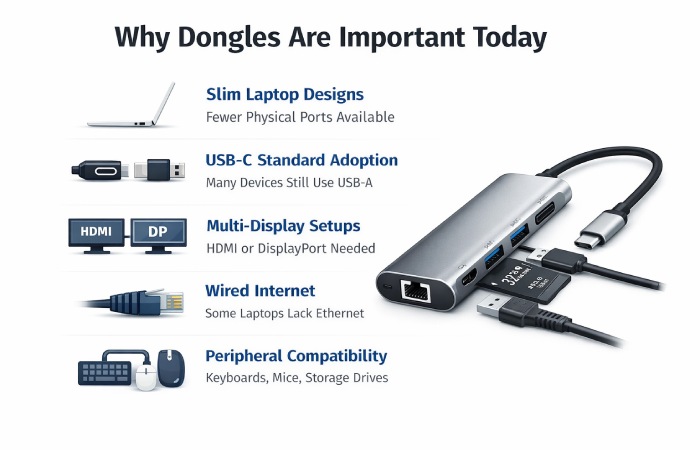
Reasons Dongles Are Important Today
| Reason | Explanation |
| Slim laptop designs | Fewer physical ports available |
| USB-C standard adoption | Many devices still use USB-A |
| Multi-display setups | HDMI or DisplayPort needed |
| Wired internet | Some laptops lack Ethernet |
| Peripheral compatibility | Keyboards, mice, storage drives |
Another factor is the rise of USB-C multi-port hubs, which allow one port to connect multiple devices simultaneously.
Types of Dongles for Laptops and Price Range
Different dongles serve different purposes. Some simply convert ports, while others act as multi-functional hubs. Dongle prices vary depending on performance, connectivity, and brand.
| Dongle Type | Primary Function | Common Ports / Connectivity | Typical Speed / Capability | Global Price Range (Approx.) |
| USB-C to USB-A Dongle | Connect older USB devices to modern laptops | USB-C → USB-A | Up to 5 Gbps (USB 3.0) | $5 – $15 |
| USB-C to HDMI Dongle | Connect laptop to monitor, TV, or projector | USB-C → HDMI | Up to 4K @ 60Hz | $10 – $30 |
| Ethernet Dongle (USB to LAN) | Provides wired internet connectivity | USB-C / USB-A → RJ45 Ethernet | Up to 1 Gbps | $15 – $40 |
| Wi-Fi USB Dongle | Adds wireless internet capability | USB-A Wi-Fi adapter | Up to 600 Mbps dual-band | $10 – $25 |
| Bluetooth Dongle | Enables Bluetooth connectivity | USB-A Bluetooth adapter | Bluetooth 4.0 / 5.0 support | $8 – $20 |
| SD / MicroSD Card Reader Dongle | Transfers files from memory cards | USB-C / USB-A → SD slot | Up to 5 Gbps transfer | $10 – $25 |
| USB-C Multi-Port Hub Dongle | Adds multiple ports in one adapter | HDMI, USB-A, Ethernet, SD card | Up to 10 Gbps + 4K video | $30 – $120 |
| Mobile Broadband Dongle (4G/5G) | Internet via SIM card and cellular network | USB modem with SIM slot | 150 Mbps – 1 Gbps depending on network | $40 – $150 |
| DisplayPort / VGA Adapter Dongle | Connects laptop to legacy displays | USB-C → DisplayPort / VGA | Up to 4K resolution | $15 – $40 |
| Thunderbolt Hub Dongle | High-performance connectivity for professionals | Thunderbolt 3 / 4 ports | Up to 40 Gbps transfer speed | $80 – $250 |
Entry-level dongles may cost as little as ₹500–₹1,500, while high-performance models can exceed ₹3,500 or more globally.
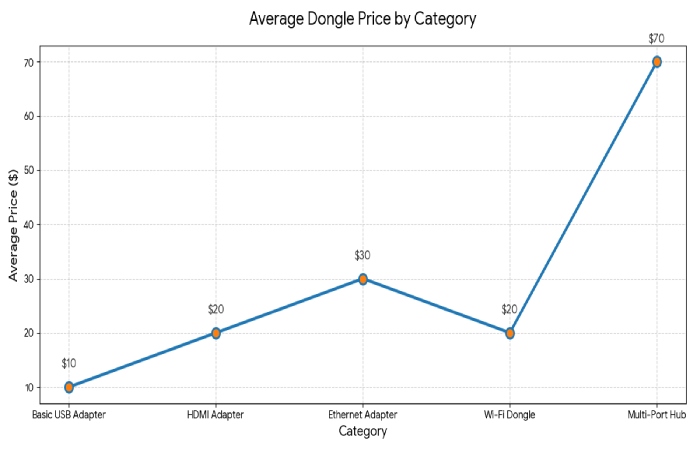
Average Dongle Price by Category
| Category | Average Price |
| Basic USB Adapter | $10 |
| HDMI Adapter | $20 |
| Ethernet Adapter | $30 |
| Wi-Fi Dongle | $20 |
| Multi-Port Hub | $70 |
Important Specifications to Check
|
Specification Category |
Standard / Feature | Typical Capability | Why It Matters |
| Data Transfer Speed | USB 2.0 | Up to 480 Mbps | Suitable for basic peripherals like keyboards, mice, and small file transfers |
| USB 3.0 | Up to 5 Gbps | Faster transfers for USB drives and external storage | |
| USB 3.2 | 10–20 Gbps | High-speed data transfer for SSDs and advanced accessories | |
| Thunderbolt 4 | Up to 40 Gbps | Ultra-fast connectivity for professional workflows, multiple displays, and high-speed storage | |
| Power Delivery Support | Power Delivery (PD) | 60W – 100W pass-through charging | Allows laptops to charge while using the dongle |
| Laptop Compatibility | USB-C charging models | Ensures the dongle can safely deliver power to supported laptops | |
| Display Capability | HDMI 1.4 | 4K @ 30Hz | Basic external monitor support |
| HDMI 2.0 | 4K @ 60Hz | Smooth display output for presentations and media | |
| DisplayPort 1.4 | Up to 8K support | Ideal for high-resolution monitors and professional editing setups |
Where to Buy Dongles?
Dongles are widely available through both online marketplaces and physical electronics stores.
Online Stores
| Platform | Availability |
| Amazon | Global shipping |
| Best Buy | North America |
| Newegg | Computer accessories |
| Flipkart | Asia markets |
| eBay | International sellers |
Many retailers sell USB-C dongles with prices ranging from about ₹1,000 to ₹4,500 depending on features.
Offline Stores
| Store Type | Examples |
| Electronics chains | Best Buy, Croma |
| Computer stores | Local PC retailers |
| Office supply stores | Staples |
| Brand outlets | Laptop manufacturer stores |
How to Choose the Right Dongle
Selecting the right dongle depends on your laptop’s ports and your usage requirements.
| Factor | Why It Matters |
| Laptop port type | USB-C vs USB-A |
| Required connections | HDMI, Ethernet, SD card |
| Data transfer speed | Determines performance |
| Power delivery | Needed for charging |
| Build quality | Prevents overheating |
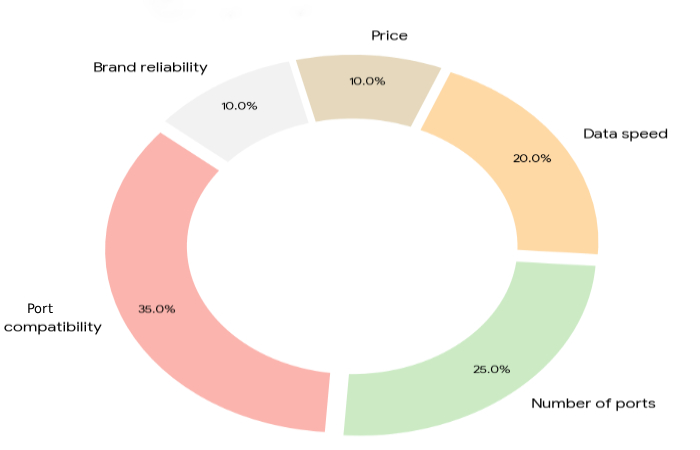
Important Buying Factors for Dongles
| Factor | Importance (%) |
| Port compatibility | 35 |
| Number of ports | 25 |
| Data speed | 20 |
| Price | 10 |
| Brand reliability | 10 |
Popular Brands of Dongles for Laptops
| Brand | Country | Popular Dongle Types | Key Features | Typical Price Range |
| Anker | USA | USB-C hubs, HDMI adapters, Ethernet dongles | Reliable performance, fast charging support | $20 – $80 |
| Belkin | USA | Multi-port adapters, USB-C hubs | Premium build quality, Apple compatibility | $30 – $100 |
| UGREEN | China | USB hubs, LAN adapters, HDMI dongles | Affordable, durable metal design | $15 – $60 |
| Satechi | USA | USB-C multi-port hubs | Premium aluminum design for MacBooks | $40 – $120 |
| Baseus | China | USB-C hubs, HDMI adapters | Budget-friendly with multiple ports | $15 – $50 |
| StarTech | Canada | Enterprise docking hubs, Ethernet adapters | Professional IT-grade connectivity | $50 – $150 |
| Targus | USA | Docking stations, USB hubs | Business-focused laptop accessories | $40 – $120 |
| Portronics | India | USB-C hubs, multi-port adapters | Budget-friendly accessories popular in India | $10 – $40 |
| Hyper | USA | High-end USB-C hubs | Advanced connectivity for creative professionals | $60 – $150 |
| Cable Matters | USA | HDMI adapters, USB hubs | Reliable cables and adapters | $15 – $50 |
| Sabrent | USA | USB hubs, storage adapters | Good performance for peripherals | $15 – $60 |
| Amazon Basics | USA | Basic USB hubs and adapters | Affordable entry-level accessories | $10 – $30 |
Does a Dongle Need a SIM Card?
Not all dongles require SIM cards.
There are two main categories:
| Dongle Type | SIM Required |
| USB adapter dongle | No |
| Mobile internet dongle | Yes |
Mobile broadband dongles function like small USB modems that connect to cellular networks using a SIM card.
Does a Dongle Give You Wi-Fi?
Some dongles provide Wi-Fi functionality.
Examples include:
- USB Wi-Fi adapters
- Mobile broadband dongles
These devices add wireless internet capability to computers that lack built-in Wi-Fi support.
Is a Dongle Better Than Wi-Fi?
This depends on the type of dongle.
| Connection Type | Speed | Stability |
| Wi-Fi | Fast but variable | Moderate |
| Ethernet dongle | Very fast | Highly stable |
| Cellular dongle | Depends on network | Moderate |
Ethernet dongles often provide more stable connections than Wi-Fi, especially in offices or gaming setups.
Dongle vs Docking Station
Many users confuse dongles with docking stations. Both devices expand laptop connectivity but differ significantly in features.
| Feature | Dongle | Docking Station |
| Size | Small portable adapter | Larger device |
| Ports | 1–6 ports | 10–20 ports |
| Power supply | Usually laptop powered | Often external |
| Price | $10–$100 | $150–$400 |
| Use case | Travel and portability | Desktop workstation |
Alternatives to Laptop Dongles
While dongles are popular, other solutions also exist.
| Alternative | Description |
| Docking stations | Desktop connectivity hubs |
| Wireless peripherals | Bluetooth keyboard and mouse |
| Cloud storage | Reduces need for USB drives |
| Wireless display casting | Screen mirroring without cables |
Pros and Cons of Using Laptop Dongles
Advantages
| Benefit | Explanation |
| Port expansion | Adds multiple connections |
| Portability | Small and lightweight |
| Cost-effective | Cheaper than docks |
| Compatibility | Works with many devices |
Disadvantages
| Limitation | Impact |
| Cable clutter | Too many adapters |
| Performance limits | Some cheap dongles slow speeds |
| Compatibility issues | May require drivers |
| Easy to lose | Small accessories |
Dongles can also introduce compatibility or security challenges if poorly designed, particularly when used with sensitive systems.
Reviews and Real-World Usage
Many professionals rely on dongles daily, especially when working with modern laptops that have limited ports.
A common sentiment in tech communities is that dongles are essential for connecting multiple devices such as monitors, SSDs, keyboards, and Ethernet simultaneously.
“A hub is $20-$70… send them a link to one that works.” — Reddit user discussing laptop dongles.
Typical users include:
- remote workers
- students
- video editors
- programmers
- IT professionals
Conclusion
Dongles have become an essential part of modern computing. As laptops become thinner and manufacturers reduce the number of built-in ports, dongles provide a practical way to maintain connectivity with external devices.
Whether you need a simple USB adapter or a multi-port hub with HDMI, Ethernet, and charging support, dongles help expand laptop functionality without requiring expensive hardware upgrades. By understanding the different types, specifications, and use cases, users can select the best dongle for their workflow.
Frequently Asked Questions
- What does a laptop dongle do?
A laptop dongle adds additional functionality to a computer, such as extra ports, wireless connectivity, or internet access.
- Can one dongle connect multiple devices?
Yes. Multi-port hubs allow several devices like USB drives, monitors, and Ethernet cables to connect simultaneously.
- Are dongles safe for laptops?
Yes, when purchased from reputable brands. Low-quality adapters may cause compatibility or performance issues.
- Do dongles reduce laptop speed?
Some cheap adapters may limit bandwidth, but high-quality dongles support fast data transfer speeds.
- Are dongles universal?
Most USB dongles are compatible with Windows, macOS, and Linux devices, but always check specifications before buying.