
An 8GB RAM laptop in 2026 is still a reasonable choice for everyday users, but 16GB is quickly becoming the new baseline even for mainstream workloads. If your budget is highly constrained and your usage mostly includes browsing, office tasks, streaming, and light multitasking, 8GB remains viable. However, for future-proofing, developers, creators, and gamers, 16GB or more is strongly recommended.
Table of Contents
What Does 8GB RAM Actually Mean?
RAM (Random Access Memory) is your laptop’s short-term working memory. It temporarily stores data that your system is actively using.
Think of it like a study table:
- Small table (8GB) → Works fine for books + laptop + notebook.
- Large table (16GB/32GB) → Better if you’re handling multiple files, tools, and heavy projects.
In modern operating systems like:
- Windows 11
- macOS Sonoma
The OS itself uses around 2–4GB RAM just to function smoothly.
That leaves roughly:
- 4–5GB available for your apps on an 8GB system.
This is where the decision becomes important.
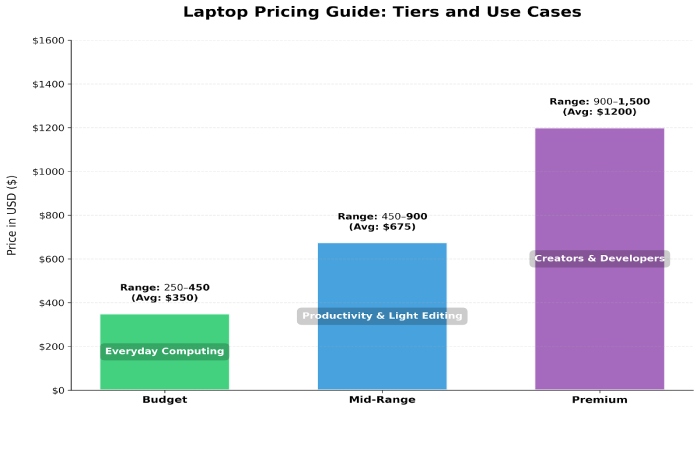
Global Pricing & Market Overview
| Price Tier | Typical Region | Specs Range | Typical Use Case |
| Budget (₹20,000–₹40,000 / $250–$450) | India / Emerging Markets | 8GB RAM, Intel N/Ryzen 3 / Basic SSD | Everyday computing, students, office |
| Mid-Range (₹40,000–₹80,000 / $450–$900) | India / US / Europe | 8GB–16GB, i5/Ryzen 5, 256–512GB SSD | Productivity, light editing |
| Premium (₹80,000+/ $900+) | US / Europe / East Asia | 16GB+, high cores, dedicated GPU | Creators, devs, heavy multitasking |
Best 8GB RAM Laptops
Base 8GB unified memory on Apple Silicon is often more efficient than traditional DDR4/DDR5 in Windows laptops — so Apple models with 8GB can punch above their weight.
Here are verified models with prices ideal for beginners and intermediates:
| Laptop | RAM | Storage | Best For | Approx Price |
| Asus Vivobook Go 14 | 8GB | 512GB SSD | Daily use, home office | ₹38,890 |
| ASUS Vivobook 15 X1504VA | 8GB | 512GB SSD | Students, productivity | ₹37,827 |
| Lenovo IdeaPad Slim 3 Ryzen | 8GB | 512GB SSD | Balanced performance | ₹41,499 |
| HP 15S‑EQ2144AU | 8GB | 512GB SSD | Everyday office | ₹42,790 |
| Dell 3530 Laptop | 8GB | 512GB SSD | Reliable mainstream | ₹43,250 |
| Lenovo IdeaPad 1 | 8GB | 256GB SSD | Budget choice | ₹22,490 |
| Apple MacBook Air M2 | 8GB | 256GB SSD | macOS, optimized performance | ₹85,990 |
| Lenovo ThinkPad E14 | 8GB | 512GB SSD | Business use | ₹54,990 |
Specifications Comparison
Here’s how these machines compare in core specs:
| Feature | HP 15S | Dell 3530 | Lenovo Slim 3 | Asus Vivobook Go 14 | MacBook Air M2 |
| CPU | Ryzen 5 5500U | Intel Core i3 | Ryzen 3/5 | Ryzen 5 | Apple M2 |
| RAM | 8GB DDR4 | 8GB DDR4 | 8GB DDR4 | 8GB DDR4 | 8GB Unified |
| Storage | 512GB SSD | 512GB SSD | 512GB SSD | 512GB SSD | 256GB SSD |
| Display | 15.6″ FHD | 15.6″ FHD | 14″ FHD | 14″ FHD | 13.6″ Retina |
| Battery | ~6–8 hrs | ~7 hrs | ~7–8 hrs | ~8 hrs | ~15 hrs |
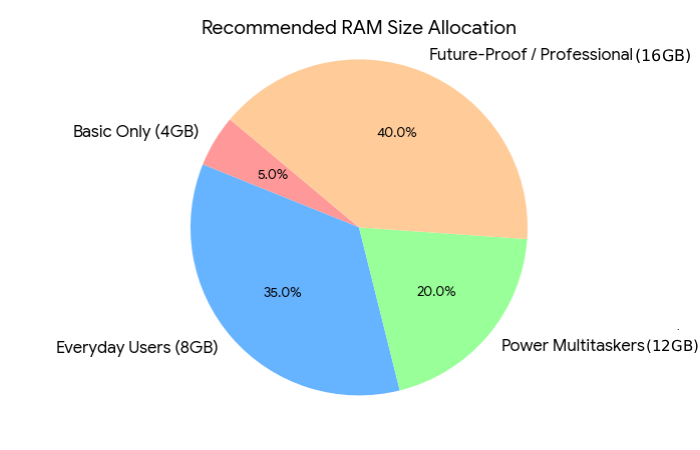
RAM Comparison – 4GB vs 8GB vs 12GB vs 16GB RAM
| Feature / Use Case | 4GB RAM | 8GB RAM | 12GB RAM | 16GB RAM |
| Typical Devices | Ultra-budget laptops | Entry-mid mainstream | Mid-range laptops | Premium/performance machines |
| Minimum OS Requirement | Barely enough | Meets standard | Exceeds baseline | Exceeds baseline comfortably |
| Everyday Browsing & Streaming | Struggles | Smooth | Very smooth | Very smooth |
| Office Work (Word, Sheets) | Basic only | Good | Excellent | Excellent |
| Multitasking (10+ tabs) | Poor | Moderate | Good | Excellent |
| Video Conferencing (Zoom/Meet) | Basic | Adequate | Smooth | Smooth |
| Coding (Light) | Challenging | Usable | Good | Great |
| Gaming (Light) | Not recommended | Limited | Good mid-range | Excellent |
| Professional Workloads | No | Limited | Good | Great |
| Future-Proofing | Very low | Moderate | Strong | Best |
| Battery Efficiency | High | Good | Moderate | Lower |
| Upgrade Flexibility | Limited | Variable | Good | Good |
| Typical Price Tier (2026) | ₹15k–₹30k / $150–$350 | ₹30k–₹60k / $350–$700 | ₹50k–₹90k / $700–$1,100 | ₹80k+ / $900+ |
| Best For | Basic typing / kids | Students / Office | Everyday + Light Creators | Devs / Creators / Gamers |
Where to Buy – Online & Offline
Online is better for discounts, EMI, flash sales, and a wider selection.
Offline is better for checking build quality, keyboard feel, display, and immediate support.
| Region | Online Platforms | Offline Stores | Why Choose Them |
| India | Amazon.in | Croma | Wide selection, easy returns |
| Flipkart | Reliance Digital | EMI options, exchange offers | |
| Croma Online | Vijay Sales | Hands-on demo before buying | |
| Reliance Digital Online | Local Authorized Dealers | In-person service support | |
| Brand Websites (Dell, HP, Lenovo, Apple) | Brand Exclusive Stores | Official warranty & customization | |
| United States | Amazon.com | Best Buy | Large inventory & price matching |
| Newegg | Walmart | In-store pickup & tech support | |
| Brand Websites | Apple Store | Direct manufacturer warranty | |
| United Kingdom / Europe | Amazon UK | Currys | Product demos & installation help |
| Brand Websites | MediaMarkt | Extended protection plans | |
| Australia | Amazon AU | JB Hi-Fi | Competitive pricing |
| Brand Websites | Harvey Norman | Physical inspection before purchase | |
| Middle East | Amazon.ae | Sharaf DG | Regional stock & warranty |
| Noon.com | Jumbo Electronics | Walk-in support centers |
Reliable 8GB RAM Laptops for Students and Professionals
| Model | Best For | Approx Price (₹) | Key Strengths |
| 13‑inch MacBook Air Apple M4 chip with 10‑core CPU and 10‑core GPU | Students & Professionals (portable & powerful) | ~₹1,30,107 | Exceptional battery life, smooth performance, premium build |
| Samsung Galaxy Book5 Intel Core Ultra Thin & Light Laptop | Professionals & Power Users | ~₹81,990 | Thin & light, strong overall performance, great screen |
| ASUS Zenbook 14 OLED Intel Core Ultra Laptop | Professionals, Creators | ~₹1,04,990 | Premium OLED display, good creative performance |
| Microsoft Surface Pro | Students & Hybrid Professionals | ~₹91,990 | 2-in-1 flexibility, touch + pen support |
| Microsoft Surface Laptop | Professionals | ~₹1,50,990 | Premium Windows experience, great keyboard & battery |
| Lenovo IdeaPad Slim 3 15ABR8 AMD Ryzen 5 Laptop | Students & Everyday Use | ~₹44,990 | Excellent value, reliable performance |
| Asus Vivobook 15 | Students & Office | ~₹44,990 | Balanced specs, good for multitasking |
| Asus Vivobook Go 14 Amd Ryzen 5 Quad Core 7520u | Students | ~₹35,990 | Lightweight, excellent price-performance |
| ASUS Vivobook 15 X1504VA‑D5321WS Intel Core i3 Laptop | Students & Light Productivity | ~₹37,827 | Affordable and competent for essentials |
| Acer Aspire Lite AL15‑53 Laptop | Students & Budget Professionals | ~₹49,990 | Great performance for price |
| Lenovo IdeaPad Slim 3 15IRH10 Intel Core 13th Gen Laptop | Professionals & Heavy Daily Users | ~₹68,990 | Solid all-around performer |
| Acer Aspire Go 14 Intel Core Ultra 5 Laptop | Students & Portal Professionals | ~₹53,990 | High satisfaction, strong daily use |
| Asus Vivobook 14 2025 Office 2024 + M365 Basic | Students | ~₹40,199 | Includes Office tools, great productivity starter |
How Much RAM Is Needed – Gaming, Students, Office Work
| Usage Type | Minimum RAM | Recommended RAM (2026) | Ideal For | Performance Expectation |
| Light Gaming (e.g., Valorant, Minecraft) | 8GB | 16GB | Casual gamers, students | 8GB works but may drop FPS during multitasking |
| AAA / Modern Gaming (e.g., Cyberpunk 2077) | 16GB | 16–32GB | Serious gamers | 8GB not recommended; 16GB is baseline |
| School Students (Docs, YouTube, 10 browser tabs) | 8GB | 8–16GB | School & basic college use | Smooth for assignments & online classes |
| College Students (Engineering / Coding) | 8GB | 16GB | Programming, light design | 8GB usable but 16GB better for IDEs & multitasking |
| Office Work (Word, Excel, Email, Browsing) | 8GB | 8–16GB | Admin, HR, business staff | 8GB sufficient for normal workloads |
| Advanced Office / Data Work (Large Excel, BI Tools) | 8GB | 16GB | Analysts, managers | 16GB improves stability with large datasets |
How Long Will 8GB of RAM Last?
If you buy an 8GB laptop today in 2026, how many useful years can you expect before it feels outdated?
Estimate (realistic):
- 2–3 years → Mainstream use remains smooth
- 3–4 years → Noticeable slowdowns with heavier software
- Beyond 4 years → Likely insufficient for professional multitasking
This trend mirrors global hardware lifecycle studies by hardware publishings and industry insights — as memory demands increase year-over-year with operating system enhancements, browser memory use, and cloud-native apps.
The main bottleneck:
RAM isn’t easy to upgrade on many ultrabooks, especially if soldered — so plan for future needs when buying.
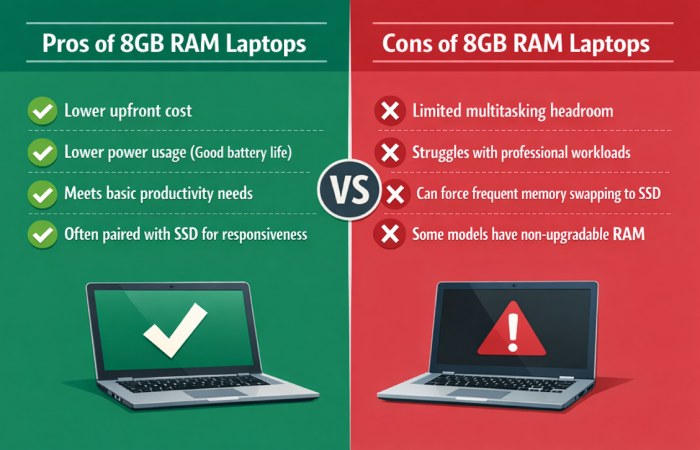
Pros & Cons of 8GB RAM Laptops
User Reviews & Feedback
Here’s a consensus from community forums and buyer feedback:
What Users Like
- Fast boot times thanks to SSDs
- Good everyday speed for browsing + work
- Lightweight models feel responsive
Common Complaints
- RAM bottleneck on heavy multitasking
- Older games and editors struggle
- Some budget builds use slower storage or displays
These trends are mirrored on consumer forums and review sites. Anecdotal Reddit consensus suggests that buying cheap 8GB laptops is acceptable only if you plan to upgrade the RAM later — otherwise, 16GB is often more cost-effective in the long term.
FAQ
Q1. Is 8GB RAM enough in 2026?
For basic tasks — yes. For heavy multitasking, editing, gaming, and professional workloads — no.
Q2. Can I upgrade RAM later?
Some laptops allow it, but newer ultrabooks often have soldered RAM—always check before buying.
Q3. Does SSD matter more than RAM?
For responsiveness and startup speed, yes—but RAM impacts multitasking more directly.
Q4. Will 8GB laptops run modern browsers like Chrome/Edge smoothly?
Yes, up to a point—but with many tabs, performance can degrade due to RAM usage.
Q5. Are Apple’s 8GB machines better than Windows with 8GB?
Apple’s unified memory architecture is often more efficient, so a base 8GB on MacBook Air may perform closer to a Windows 16GB laptop in some workloads.
Final Verdict
8GB RAM laptops in 2026 are still relevant, but become a budget-oriented trade-off rather than the recommended baseline. If you’re a student, office user, or buyer on a tight budget, they’re fine—just be realistic about limitations and upgrade paths.
For users who want longevity, heavier workloads, or creative performance, stepping up to 16GB RAM is increasingly the smarter choice.